Home  /  Equipment  /  JBL Wireless Mics
JBL wireless microphone hire Melbourne
Add-on

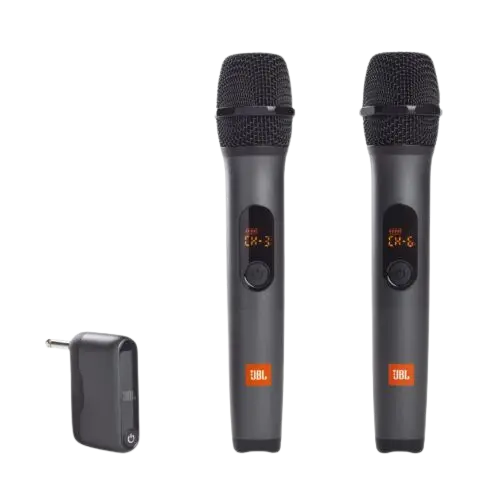
JBL Wireless Microphones

Rent two JBL wireless microphones for your Melbourne event — perfect for wedding speeches, toasts, MC announcements, or karaoke. The set includes two handheld microphones, a wireless receiver that plugs directly into either of our speakers, and pre-installed batteries. No messy cables running across the floor, no complicated setup. Both mics can be used simultaneously, making this ideal for events with a celebrant and MC or two performers.

2 microphones included
Wireless — no cable runs
Batteries included
Both mics usable simultaneously
Works with JBL 710 & Vonyx
Auto-pair on startup
Not waterproof
Quantity2× handheld microphones
ReceiverWireless (6.3mm + 3.5mm output)
BatteriesIncluded (AA)
Best ForSpeeches, karaoke, announcements
PickupClayton, VIC 3168
$20/day
With speaker hire · $30 standalone
💡 Best value: Book the Perfect Event Package — JBL PartyBox 710 + 2× Wireless Mics for $69/day. Saves $10 vs hiring separately.

When Do You Need Wireless Microphones?

Almost any event with a group of 30+ people benefits from a microphone. Without one, speakers have to shout to be heard over background noise and chatter — and guests at the back miss key moments. A microphone ensures everyone hears speeches, announcements, and the MC clearly regardless of where they're standing.

Wireless microphones specifically are a significant upgrade over wired ones for most events. No cable snaking across the floor means no trip hazard, no limitation on where the speaker can walk, and a much cleaner setup. For karaoke, wireless mics also let performers move around freely.

Our JBL wireless mics are designed to work directly with the JBL PartyBox 710 and Vonyx 1000W — no adapters or separate receivers needed. The receiver plugs straight into the speaker's Mic input, and both mics pair automatically when switched on.

Microphone hire is ideal for:

Wedding speeches and toasts
Celebrant at ceremony
MC announcements
21st birthday speeches
Karaoke nights
Corporate presentations
Community events and fetes
Engagement party toasts

Microphone Setup Guide

1
Plug in the receiver
Locate the Mic input port on the rear panel of your JBL PartyBox 710 or Vonyx speaker (it's a standard 1/4-inch socket). Plug the wireless receiver unit into it firmly.
2
Switch on the receiver
Press the power button on the receiver. The LED should glow green or red to indicate it's active and searching for the microphones.
3
Turn on each microphone
Press and hold the power button on each microphone for 2 seconds. They will auto-pair to the receiver — the LED on each mic turns green when connected.
4
Set the mic gain
On the speaker, find the Mic Gain dial above the mic input port. Start at 50%. Speak into the mic at normal volume and adjust the gain up or down until you hear a clear, natural sound. Avoid going above 80% or you risk feedback.
Tip: Always stand beside or behind the speaker when using a microphone — never directly in front of it — to prevent feedback squealing.

Wireless Microphone Hire — FAQ

Do the wireless microphones work with the JBL PartyBox 710?
Yes. The wireless receiver plugs directly into the 1/4-inch Mic input port on the rear panel of the JBL PartyBox 710. Switch on the receiver, then each microphone — they pair automatically. The JBL also has a dedicated Mic Gain dial to control the microphone volume independently from the music.
Can both microphones be used at the same time?
Yes. Both wireless microphones can operate simultaneously through the same receiver. This allows two people to speak at the same time — ideal for a wedding celebrant and MC, karaoke duets, or panel discussions at corporate events.
How do I stop microphone feedback (the squeal)?
Three rules: (1) never stand directly in front of the speaker with the mic — always stand beside or behind it, (2) hold the mic by the handle and keep the grille uncovered, (3) start the Mic Gain at 50% and increase slowly. Most feedback is caused by the mic user standing too close to the speaker or cupping the grille.
How long do the batteries last?
The included batteries typically last 4–6 hours of continuous use — more than enough for a standard party. We include fresh batteries with every hire. If your event runs longer than 6 hours, a spare set of AA batteries is a good precaution.
Can I hire just the microphones without a speaker?
Yes, you can hire the microphones as a standalone add-on at $30/day. However, they require a speaker with a compatible mic input to work. All our speakers (JBL PartyBox 710 and Vonyx 1000W) are compatible. To save $10, book the Perfect Event Package which includes the JBL 710 and 2× mics for $69/day total.

Add wireless mics to your speaker hire for just $20/day

See Full Package ($69)