Home  /  Equipment  /  JBL PartyBox 710
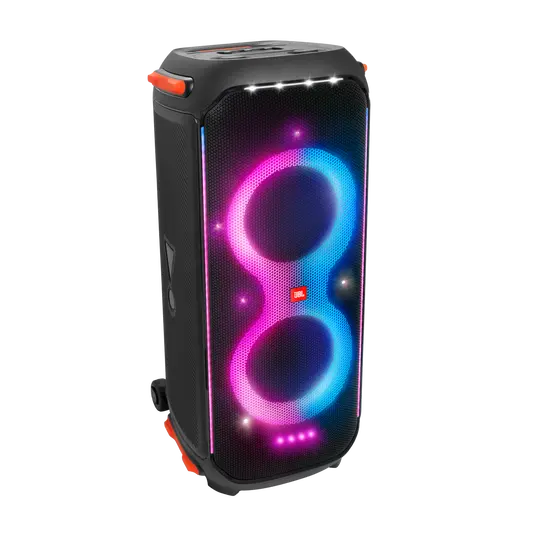
JBL PartyBox 710 party speaker hire Melbourne
Most Popular Save $36

JBL PartyBox 710 Party Speaker Hire

Looking for the ultimate party speaker hire in Melbourne? The JBL PartyBox 710 is our most popular choice. At 800 watts RMS, it delivers the kind of deep, chest-thumping bass that makes a dance floor. Built-in music-sync RGB lighting eliminates the need for a separate lighting hire. Simple Bluetooth 5.1 pairing means anyone can set it up — no sound engineer or technician required. Perfect for 21sts, house parties, wedding receptions, and corporate events for up to 120 guests. Need a setup for speeches? Check out our PA system hire.

800W RMS output
Built-in music-sync lights
Bluetooth 5.1 pairing
Mic & guitar input (1/4")
Easy-glide wheels for transport
JBL app light customisation
Requires 240V wall power
Not waterproof — keep under cover
Power Output800W RMS
ConnectivityBluetooth 5.1 + AUX + Mic In
Light ShowBuilt-in RGB music-sync LEDs
Best ForParties up to 100–120 guests
PickupClayton, VIC 3168
$85/day
$49/day

Is the JBL 710 the Right Party Speaker Hire for You?

The JBL PartyBox 710 handles the vast majority of Melbourne party hire scenarios perfectly. It works best for indoor events — backyards, halls, function rooms, living rooms — where you have access to a wall power point. The 800W output means it stays clear and punchy even at high volumes, without distorting.

The built-in light show is a genuine bonus that most hirers don't expect until they see it in action. It syncs to the beat automatically — warm colours on bass hits, quick flashes on snares. For most 21sts and wedding receptions, it completely replaces a separate lighting hire.

If your venue is very wide (more than 15 metres) or you need sound on both sides of a large room, the Vonyx 1000W dual system may serve you better. But for a standard Melbourne backyard or function room, the JBL 710 is the right choice.

What's included in the hire

JBL PartyBox 710 speaker unit
240V power cable
AUX 3.5mm audio cable
Setup guide (printed + digital)
Phone support during your event

Wireless mics available as add-on — $20/day (bundled) · $30/day (standalone)

Quick Setup Guide

1
Position & power on
Roll the speaker (it has built-in wheels) to your venue position. Plug the power cable into a 240V wall outlet and turn it on using the power button on the top panel.
2
Pair Bluetooth
Open Bluetooth on your phone and select 'JBL PartyBox 710' from the list. It pairs just like headphones. The blue Bluetooth light on the speaker will stop flashing when connected.
3
Connect wireless mics (if hired)
Plug the small wireless receiver into the Mic input port on the rear panel. Turn on the receiver first, then the microphone. They pair automatically.
4
Set volume & play
Start with master volume at 40% and mic gain at 50%. Press play on your phone. Increase volume slowly. The light show activates automatically with music.

JBL PartyBox 710 Party Speaker Hire — FAQ

How many people can the JBL PartyBox 710 cover?
Comfortably 80–120 guests indoors, or 60–80 people in an outdoor undercover area. The 800W output is more than enough for standard Melbourne party venues. For very wide rooms or venues with 150+ guests, the Vonyx 1000W dual system provides better all-round coverage.
Does the JBL PartyBox 710 need a power outlet?
Yes. To deliver 800W of output, it requires a standard 240V wall outlet. It draws approximately 5–8A at full volume. It is not battery-powered. For outdoor events without mains power, a Honda-style inverter generator (2000W+) will work — make sure it's an inverter type, not a standard construction generator, as the digital amplifier inside requires clean power.
Can I use wireless microphones with the JBL PartyBox 710?
Yes. The rear panel has two 1/4-inch inputs labelled Mic and Mic/Guitar. Our wireless mic add-on plugs a small receiver into either port — the mics pair automatically. We also have echo and gain dials above the inputs for easy adjustment. Add wireless mics for $20/day when hired with a speaker.
How do I connect my phone via Bluetooth?
Turn the speaker on. Open Bluetooth settings on your phone and select 'JBL PartyBox 710'. It pairs exactly like headphones. Bluetooth 5.1 gives a stable, strong signal. If you prefer a wired connection, use the included AUX cable.
Can I use the JBL PartyBox 710 outdoors?
Yes — but it must stay under cover (patio, pergola, marquee) at all times. It is not waterproof and must not be exposed to rain, dew, or moisture. Position it away from any lawn sprinklers. Any moisture damage would be covered by your security deposit.

Ready to book the JBL PartyBox 710 for your Melbourne event?

See Package Deal