Home  /  Equipment  /  Perfect Event Package
Best Value Bundle

Audio Hire Melbourne:
The Perfect Event Package

The ultimate audio hire in Melbourne. JBL PartyBox 710 + 2× Wireless Microphones. Everything you need for speeches, music, and dancing — bundled and discounted.

JBL PartyBox 710 speaker audio hire + JBL wireless mics audio hire
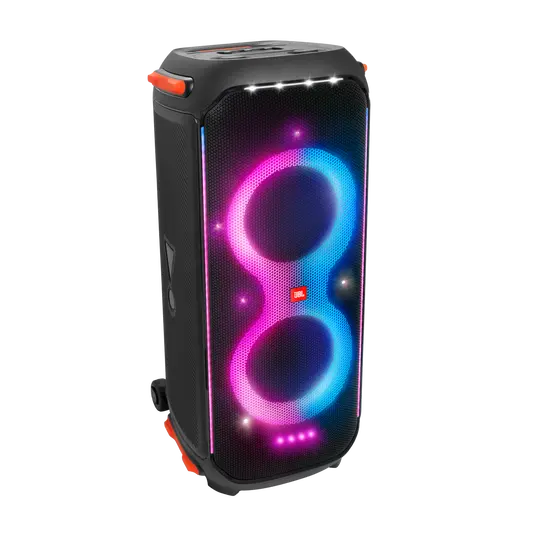
JBL PartyBox 710 (800W)
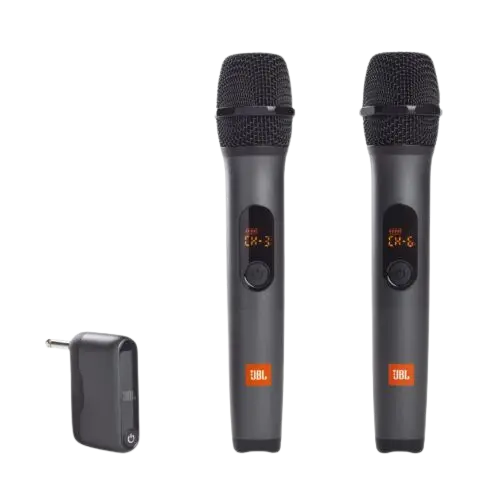
2× JBL Wireless Microphones
Built-in Music-Sync Light Show
Saves $10 vs renting separately
Ideal for weddings & 21sts
Local Pickup Clayton 3168
$79/day separately
$69/day
⚠️ Not waterproof. Requires 240V wall power.

Why the Perfect Event Package?

Most Melbourne events need exactly two things from their audio hire: great music for the party, and clear microphones for the speeches. Hiring these separately costs $79/day. The Perfect Event Package gives you both for $69/day — saving you $10 with zero compromise on quality.

The JBL PartyBox 710 handles both jobs seamlessly — it has a dedicated Mic input port on the back that the wireless receiver plugs directly into, and separate gain controls for music volume and mic volume. You can have background music playing and the mic live at the same time, then cut the music for a speech with one button.

The built-in music-sync light show also saves you a separate lighting hire. For a wedding reception or 21st birthday, the JBL 710's RGB panel creates the atmosphere you'd normally need a dedicated lighting rig to achieve.

Everything in the package

JBL PartyBox 710 (800W speaker)
2× JBL wireless handheld microphones
Wireless receiver unit (plugs into speaker)
Batteries for both microphones
Power cable (240V)
AUX 3.5mm audio cable
Setup guide — printed and digital

Package Setup Guide

1
Power on the speaker
Roll the JBL PartyBox 710 into position. Plug into 240V and switch on using the top-panel button. Keep it under cover throughout.
2
Plug in the mic receiver
Connect the small wireless receiver to the Mic input on the rear panel. There are two ports — use either one. Both green LEDs should light up.
3
Turn on the microphones
Switch each microphone on using the side button. They pair to the receiver automatically within 2–3 seconds. The LED on the mic will turn green when paired.
4
Pair Bluetooth for music
Open Bluetooth on your phone, select 'JBL PartyBox 710', and connect. You can now play music through your phone while the mics remain live and ready.
5
Balance music & mic levels
Set music volume to 40–50%. Use the dedicated Mic Gain dial (above the mic inputs on the back panel) to set microphone level. For speeches, the mic should be clearly audible without feedback.
⚠️ Not waterproof — must stay under a roof, patio, or marquee at all times. Requires a standard 240V wall outlet.
Audio Hire Package — FAQ

What is included in the Perfect Event Package?
The package includes: JBL PartyBox 710 (800W speaker with music-sync lights), 2× JBL wireless handheld microphones, wireless receiver, power cable, AUX cable, and batteries. Everything you need for a complete event audio setup — nothing extra required.
Is the Perfect Event Package good for weddings?
Yes — it's our most popular wedding audio hire. The JBL 710 covers ceremony and reception music while the two wireless mics handle the celebrant, speeches, and MC. The light show adds reception atmosphere. The package saves $10 vs hiring speaker and mics separately.
How do the wireless microphones connect to the JBL PartyBox 710?
The wireless receiver plugs directly into the Mic input port on the rear panel of the JBL PartyBox 710. Turn on the receiver first, then each microphone — they pair automatically. Both mics can be used simultaneously. Adjust the Mic Gain dial to set volume independently from the music.
Can two people use microphones at the same time?
Yes. Both wireless microphones are included and can be used simultaneously. The receiver has two active channels. This makes the package ideal for weddings with a celebrant and MC, or 21sts where two people might give a speech together.
How do I prevent microphone feedback with this package?
Three rules: (1) never point the mic directly at the speaker — the speaker should face the crowd and the mic user should stand beside or behind it, (2) hold the mic by the handle, not the grille, and (3) keep the Mic Gain below 70% unless the room is very large. Read our full feedback prevention guide for more tips.

📍 Pickup: Clayton 3168 · Exact address sent on confirmation